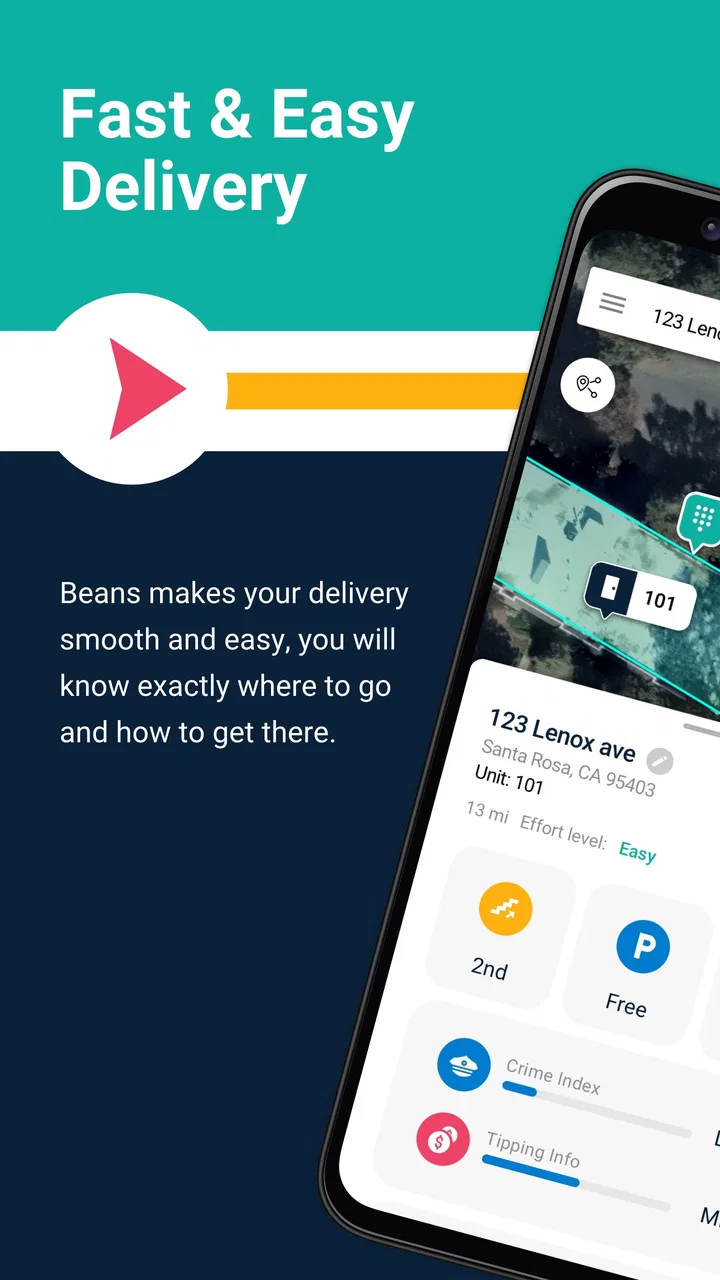
Beans - Maps for Apartments
- 2.1
- Rating
- 50.00K
- Installs
- Free
- Price

 Analysis by App-foxy
I approached Beans - Maps for Apartments as a practical navigation app for the awkward moments that happen around apartment buildings: finding the right entrance, helping a delivery reach the correct place, or giving someone clearer directions than a street address alone can provide. It is listed in Maps & Navigation and comes from One Hundred Feet, Inc., but it feels more focused than a general-purpose map. The useful question is not whether it can replace every map app on your phone. It is whether apartment-related navigation is the part of your day that repeatedly causes confusion.
That distinction matters. A normal map is usually excellent at getting me to a street, a building, or a nearby road. The final stretch can still be messy, especially when several entrances share one address, parking is separated from the lobby, or a courier needs to know which building to approach. Beans is aimed at that last section of the journey. My overall impression is that its value depends heavily on the quality and usefulness of the apartment information available for the places I need.
Where the app fits into a shared household
The clearest everyday scenario is a household that receives frequent deliveries. Imagine one person is working, another is away, and a courier calls from outside a large apartment complex. Instead of trying to explain the route from memory, the person at home can use an apartment-focused map to clarify the destination. That does not eliminate every delivery problem, but it can reduce the familiar back-and-forth over entrances, driveways, and parking areas.
You May Also Like

 Blood Strike: 2.5 Anniversary
Blood Strike’s Loadouts Turn Every Drop Into a Tactical Gamble
A close look at Blood Strike’s custom loadouts: how fast access to signature weapons reshapes its battle royale rhythm, rewards preparation, and narrows the gap between fights.

 Pandora - Music & Podcasts
Pandora’s Music Is Easy to Start, but Harder to Recover
Pandora’s strength is its low-effort path from a seed to a station. Its weak spot is how much confidence it asks you to place in connection, setup, and quiet recovery.

 8 Ball Pool
 Is Built on Rivalries, Rematches, and Routine
A close look at the rivalries, rematches, shared routines, and unanswered safety questions that turn a quick pool match into a persistent mobile community.

 Samsung Music
’s Quiet Strength Is Playing What You Already Own
Its reach comes less from spectacle than from dependable access to a personal library. That simplicity is both the app’s strongest retention engine and its ceiling.

 AccuWeather: Weather Radar
AccuWeather Review: A Quick, Clear Forecast for Everyday Decisions
For everyday plans, the best forecast is the one you can understand quickly. AccuWeather makes rain timing, radar, and local conditions easy to act on, with a few trade-offs.

 Hill Climb Racing
Why Hill Climb Racing Still Turns Crashes Into One More Run
A tiny car, a bumpy hill and one more upgrade: Hill Climb Racing keeps resurfacing because its simple chaos makes every near-miss feel personal.
More From Our News Desk
View All News


I also see a use for roommates who do not arrive home together. One person may know the building well while another is returning after dark or visiting for the first time. A map centered on apartments is more relevant in that situation than a broad city map filled with unrelated roads and businesses. The benefit is not flashy; it is the ability to keep the conversation focused on the property rather than forcing someone to interpret a full navigation screen.
For a household using one phone or tablet as a shared reference, I would treat Beans as a coordination tool rather than a personal diary or a complete navigation replacement. The app can help people discuss a destination, but the household still needs an agreed way to communicate which apartment, entrance, or parking area is intended. A map cannot resolve an ambiguous instruction such as “meet me at the front.” The person giving directions should still name the building or landmark clearly.
One practical habit is to check the destination before a delivery is already waiting outside. If I open the app only after a courier has called, I have less time to compare the apartment location with the message I received. Looking it up earlier lets me spot whether the useful route ends at a main entrance, a side access point, or a parking area. That small change makes the app more valuable than treating it as an emergency button.
What I would expect during a normal delivery
Beans is most interesting at the boundary between ordinary directions and property-level details. I would start with the apartment destination, inspect the surrounding roads and access points, and then use the result to give a concise instruction. For example, instead of sending a long text, I might tell a courier which side of the property to approach and where I will meet them. The app is useful here because the conversation becomes anchored to a map rather than memory.
There is also a trade-off. If the apartment information is incomplete, outdated, or not detailed enough for a particular complex, I may still need a standard map or a phone call. That means I would not rely on Beans alone for a time-sensitive delivery, a medical visit, or an unfamiliar trip where missing a turn would create a serious problem. Its specialized focus is helpful when it matches the property, but specialization also means it is not automatically the best tool for every address.
Setting it up without blurring account boundaries
The app is free to install, with optional in-app purchases listed at $4.99 per item. I would begin with the free experience and test it against the apartment locations that matter to my household before spending anything. That is especially important when several people share a device: everyone should understand what the app is being used for and whether a purchase is actually needed for the household’s routine.
Because Beans is designed around apartment maps, the first setup conversation should be about destinations, not personal profiles. A shared device can be useful for a common building or a recurring delivery location, but I would avoid assuming that one person’s saved places or preferences should automatically represent everyone else. If roommates use the same phone, a quick verbal check before changing a location prevents one person from mistaking another person’s destination for their own.
I would also keep the app separate from the household’s broader navigation habits. Standard map apps are still better suited to planning a complete drive, checking traffic, comparing routes, or navigating across town. Beans can be the apartment-specific reference at the end of that trip. Using it in combination with a familiar driving app is more realistic than expecting one specialized tool to handle the entire journey.
The current version is 5.4, and the app requires Android 6.0 or later. That makes compatibility worth checking before installing it on an older shared handset. A device that stays in the kitchen, hallway, or entry area may not be updated as often as a personal phone, so the operating-system requirement should be considered before making it the household’s main reference screen.
I would also pay attention to the difference between installing an app for occasional use and making it part of a shared routine. Occasional users can simply open it when needed. A household that expects several people to depend on it should agree on who checks the destination, who communicates with the visitor, and which ordinary map app handles the longer drive. Those boundaries prevent the app from becoming one more source of confusion.
Why a shared device can help, and where it can fail
A shared device has one obvious advantage: the person answering a delivery call may not be the person who normally uses navigation. A common map reference gives everyone a starting point. It can be left available for a visitor, a roommate, or a family member who needs to identify the correct apartment area without searching through someone else’s personal phone.
The weakness is that shared devices often lack context. A personal phone may contain the conversation, order details, or exact instructions that explain why a particular entrance matters. Beans can show the apartment-oriented location, but it cannot replace the human context around a delivery. I would therefore use the app alongside the message or order screen, not as the sole source of truth.
Another useful boundary is to avoid sharing more location information than necessary. If I am helping a courier find a building, I can provide the relevant access point without turning the entire household’s movements into a group discussion. The app’s usefulness comes from narrowing a destination, not from making every household member aware of every trip.
Coordinating arrivals, parking, and directions
The store summary points toward apartments, maps, delivery, parking, deliveries, navigation, directions, and driving. Those terms describe a practical chain: reach the property, understand how to approach it, and coordinate the final handoff. In my view, the parking angle is particularly important because apartment navigation often fails after the driver has technically reached the correct address.
A street map may guide a driver to the property but leave questions unanswered. Is the visible entrance for residents or visitors? Is the parking area on the opposite side? Does the driveway lead to the building or merely pass it? Beans is worth trying when those questions happen often enough to justify an apartment-focused tool. It does not make every complex simple, but it directs attention to the parts of the trip that general navigation tends to treat as an afterthought.
For shared household coordination, I would use a three-step routine. First, identify the apartment destination in the app. Second, compare the map with the actual instruction from the resident, delivery service, or visitor. Third, send one short, location-specific message. This is better than copying a long route description that may be misunderstood on a phone screen.
A non-obvious advantage of this workflow is that it separates route planning from arrival coordination. The driver can use a regular navigation app to reach the neighborhood, while the resident uses Beans to explain the property-level approach. That division of labor is sensible: one tool handles the journey, and the other helps with the final handoff. It also means I do not need to abandon a navigation app I already trust.
There is a corresponding limitation. If a household expects live traffic intelligence, transit planning, turn-by-turn driving guidance across a city, or broad place discovery, a mainstream mapping service will usually be the stronger primary choice. Beans makes more sense as a companion for apartment destinations than as the only map installed on a phone.
When the specialized view is genuinely useful
I would recommend testing Beans at a property where ordinary maps have already caused trouble. Large apartment communities, buildings with several access roads, and deliveries that repeatedly end at the wrong entrance are good examples. The app has a clear chance to earn its place when the problem is not “How do I reach this neighborhood?” but “How do I reach the correct part of this apartment property?”
It is less compelling for a simple house address, a familiar short drive, or a trip where the destination is a clearly marked public building. In those cases, opening a general map may be faster. The specialized focus should solve a recurring problem, not add an extra step to every journey.
I would also avoid assuming that the app can settle disagreements about access. A map may show a road or parking area, while a resident knows that an entrance is restricted, temporarily closed, or intended for a different group. The safest workflow is to use the map for orientation and the resident’s current instruction for final confirmation.
Age, trust, and sensible household use
Beans carries an Everyone content rating, which makes its subject matter broadly suitable for a household device. That does not mean every navigation decision should be handed to a child without supervision. A map can help someone understand where an apartment is, but an adult should still decide what location information is appropriate to share and whether a visitor should be met outside.
For older children or teenagers, I could see the app helping with a simple arrival plan: identify the apartment building, agree on a meeting point, and explain which entrance to use. I would keep the instructions concrete and avoid treating the map as proof that a route is safe or accessible. A familiar adult should remain responsible for the final plan, especially at night or in an unfamiliar complex.
Trust is also relevant among adults. Roommates and family members may share a device without wanting to share every destination. I would make the app’s role explicit: it is for finding and discussing apartment-related locations, not for monitoring where other people go. That expectation keeps a useful navigation tool from becoming a source of unnecessary tension.
The app has around a 2.1 average from roughly 1.5 thousand ratings, with more than 500 reviews. I would read that reception as a reason to test it personally rather than assume the concept will work equally well for every apartment community. A low average does not tell me that the app is useless, but it does make a trial run sensible before I build a household routine around it.
Its reach is also modest, with over 50 thousand installs. That does not determine whether it will work for my address, but it suggests I should judge it by a real local test instead of popularity alone. I would search for the apartment locations I actually use, try the app during a calm moment, and compare the result with a standard map and the instructions from someone who knows the property.
Questions I would answer before making it a household default
Would I use it for every drive? No. I would use Beans for apartment-focused orientation and keep a conventional navigation app for the wider route. That combination gives me better coverage and avoids forcing a specialized map to perform tasks outside its strongest purpose.
Would I pay immediately? No. Since the app is free to start and individual in-app purchases are listed at $4.99, I would first confirm that the free experience solves a recurring problem. A purchase only makes sense if the relevant apartment workflow becomes clearly more useful after testing it.
Can it replace calling the resident or courier? I would not count on that. The app can support a clearer explanation, but access rules, temporary changes, and personal meeting arrangements still belong in a direct message or call. The best result comes from combining the map with current human instructions.
Is it suitable for an older shared phone? It may be, provided the device runs Android 6.0 or later and performs well enough for map use. I would test it on the actual device rather than assume that an older handset will feel comfortable, especially if several household members need to read the screen quickly.
Who should skip it? I would skip it if my navigation needs are mostly highways, public transit, business discovery, traffic avoidance, or ordinary house addresses. I would also hesitate if my apartment community is already easy to understand in a standard map and deliveries rarely go wrong. In those situations, Beans may add an unnecessary stop between the request and the directions.
My household verdict after weighing the trade-offs
I see Beans - Maps for Apartments as a focused tool for the final, confusing part of reaching an apartment. Its strongest role is shared coordination: helping a resident, roommate, visitor, or courier talk about the right building, approach, or parking area without relying entirely on memory. That is a narrower promise than full navigation, but it is also the reason to consider it.
My recommendation is conditional. If apartment deliveries and multi-building access regularly create confusion, I would install it, test the places I use most, and pair it with my usual map app. I would establish simple household boundaries around who checks the destination and who shares the directions. I would also keep expectations realistic when access information needs confirmation from a resident.
If my household rarely deals with complicated apartment layouts, I would not make it a default navigation app. The modest user reception and specialized scope make a personal trial more sensible than an automatic recommendation. Still, for the right building and the right recurring problem, an apartment-centered map can be more useful than another general map that stops being specific exactly when the driver reaches the property.
In short, I would recommend Beans to people who need better apartment-level coordination, not to everyone looking for a replacement for their everyday maps. Its real strength is reducing ambiguity at the destination. Used that way, it can make deliveries and shared arrivals easier to organize while leaving long-distance driving, traffic, and broader route planning to the tools already built for those jobs.
FAQs for Beans - Maps for Apartments
01What is Beans - Maps for Apartments?
Beans - Maps for Apartments is a navigation and apartment-finding app designed to make large residential communities easier to explore. It can help users locate apartment buildings, entrances, parking areas, amenities, leasing offices, and other useful points within selected properties. The app is particularly helpful when standard map services do not clearly show the layout of an apartment complex or community.
02How does Beans help me find an apartment or residential building?
The app provides detailed maps and location information for participating apartment communities. Depending on the property, you may be able to search for a building, unit area, leasing office, amenity, parking location, or entrance. This can make property visits and deliveries less confusing, although coverage and the level of detail may vary depending on the community and the information available in the app.
03Can Beans be used for apartment deliveries and finding building entrances?
Yes, one of the practical uses of Beans is helping visitors, residents, and delivery drivers navigate apartment communities. It may show entrances, buildings, roads, parking areas, and other points that are often missing or inaccurate on traditional map apps. However, users should still follow property rules, posted signs, access instructions, and any directions provided by residents or management.
04Does Beans - Maps for Apartments work in every city or apartment complex?
Beans is not guaranteed to provide the same coverage everywhere. Its usefulness depends on whether a specific apartment community has been mapped and how current the available property information is. Before downloading, users should check the app’s supported locations and recent reviews. Even in covered areas, construction, renamed buildings, changed access routes, or incomplete data may affect navigation accuracy.
05Is Beans - Maps for Apartments free to download and use?
The app may be available to download at no initial cost, but its current pricing, optional features, advertisements, or account requirements can change over time. Some functions may depend on location availability or partnerships with property communities. It is recommended to review the official store listing for the latest details about in-app purchases, subscriptions, privacy permissions, and whether all mapping features are accessible without payment.
Pros
- Focused on discovering apartments and homes directly on an interactive map.
- Map-based browsing makes comparing neighborhoods quick and intuitive.
- Useful for spotting listings near preferred streets
- landmarks
- or transit.
- Can help narrow searches by location before reviewing individual properties.
- Clean concept for users who prioritize area over traditional list browsing.
Cons
- Listing availability may vary significantly depending on your city or region.
- Map views can feel cluttered when many properties appear close together.
- Property details may depend on information supplied by third-party listings.
- Frequent location access may affect battery life during extended searches.
- It may not replace a full rental platform for applications or lease management.

Beans - Maps for Apartments
Gallery